Models & AI · 12 min read · Updated 2026-09-03
Why does the Agent say “No quota” or “Rate limited” when I already have a subscription?
Already have a provider subscription, but the TabTin Agent still says no quota, insufficient balance, or rate limited? Check model routing, organization credits, and upstream limits step by step.
Buying a subscription from Kimi, MiniMax, Volcengine Ark, ChatGPT, or another provider does not mean every Agent request in TabTin automatically uses it.
An Agent task usually goes through three layers:the model selected for the current task, its model service or upstream account, and the TabTin organization’s AI services and credit rules. A mismatch at any layer can cause “No quota,” “Insufficient balance,” or “Rate limited.”
Remember:Subscription eligibility, model service quota, TabTin organization credits, and upstream rate limits are four different things.
The key points
- A provider app subscription does not automatically transfer to TabTin. Access depends on whether TabTin offers the corresponding account authorization, subscription connection, or API connection method for that service.
- Connecting a model does not mean the current task is using it. The task may still use a TabTin preset model, a team default, or another Organization BYOK model.
- TabTin preset models and some AI capabilities consume organization credits. The current AI service toggles page shows charges deducted in this order: plan credits → credit packs → organization balance.
- Remaining LLM quota and available credits may be different pools. In the usage center, check both “Remaining LLM quota” and “Available balance” in the credit details.
- “Rate limited” does not necessarily mean your balance is zero. It usually means an upstream service restricts request frequency, concurrency, or token usage within a time window. You may be temporarily unable to continue even with a remaining balance.
- Agent tasks may consume more than ordinary chat. One task may include multiple model calls, tool calls, retries, or sub-Agents, not just one request.
What are subscriptions, quotas, credits, and rate limits?
| Name | What it means | Where to check |
|---|---|---|
| Provider subscription | Subscription benefits purchased from Kimi, MiniMax, Volcengine Ark, or another provider | The provider’s subscription status, plan type, and account |
| Upstream API / Coding Plan quota | The requests, tokens, or spending allowed by a specific model service | Usage, balance, and plan limits in the upstream provider’s console |
| TabTin organization credits | The organization’s internal quota for TabTin preset models and some AI capabilities | Organization settings → Subscriptions & billing, AI service controls |
| Rate limit | Upstream restrictions on request frequency, concurrency, or tokens within a time window | Error codes, upstream service status, and current concurrent task count |
“I already have a subscription” only suggests the first item may be valid. It does not prove the other three are available.
The six most common causes
1. The current task has not selected your connected model
You may have connected Kimi, ChatGPT Codex, or Volcengine Ark, but new tasks still use a TabTin preset or team default. Those requests follow a different quota path, unrelated to your subscription.
Open the task’s model picker and check:
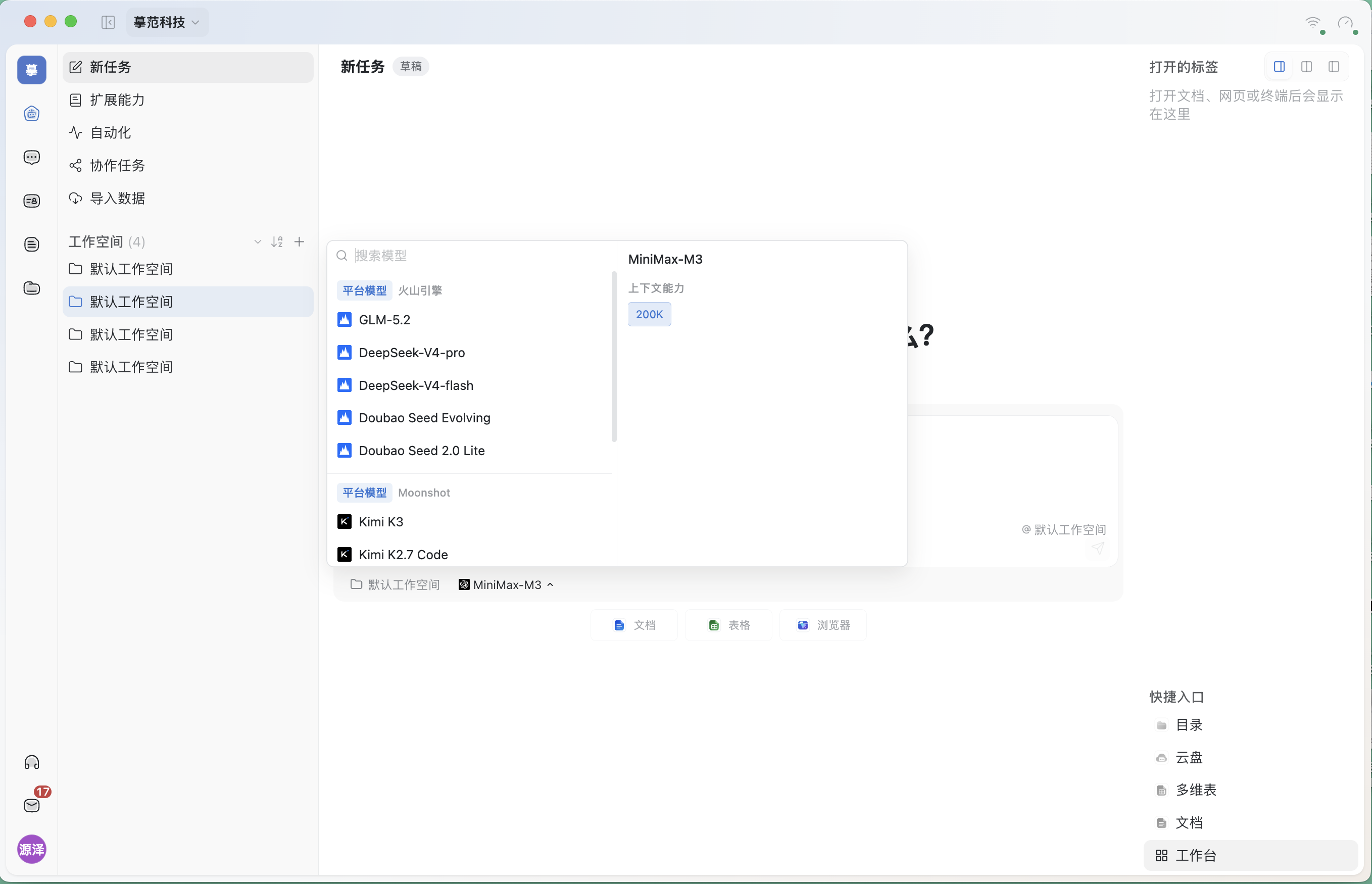
- Is the full model name correct?
- Is it under “Platform models” or “Organization BYOK”?
- Is there a notice such as “Your own key · No credits deducted”?
- Is the current default under “Mine” or “Team,” and does it follow team settings?
2. You bought a subscription but connected a different type of API account
Many providers offer monthly subscriptions, Coding Plans, and pay-as-you-go APIs. Their keys, endpoints, and quotas are usually separate.
For example:
- A Coding subscription uses its dedicated Coding connection method.
- A pay-as-you-go API uses a separate API key and balance.
- ChatGPT Codex requires ChatGPT sign-in authorization and is not the same as OpenAI’s pay-as-you-go API.
- Doubao-related services appear as Volcengine Ark in the current interface. Do not assume a Doubao app subscription can be transferred as API quota.
Using a subscription key in a pay-as-you-go connection, or a pay-as-you-go key in a subscription connection, may cause authentication failure, no quota, or service unavailability.
3. Remaining LLM quota and available credits are not the same number
TabTin preset models consume organization credits. Some capabilities, such as email AI and voice, may still use TabTin platform models. An easily overlooked distinction is that remaining LLM quota and available credit balance may be displayed separately.
Under Subscription and billing → Usage center shows “Monthly LLM allowance / Remaining LLM quota” separately from “Available balance” in the credit usage details. You may therefore see zero remaining LLM quota while the available credit balance is still positive. The latter does not guarantee the current Agent can continue using an LLM.
The screenshot’s figures are a snapshot of the test organization at verification time. Actual quota changes with organization, time, and consumption. Check both locations when troubleshooting, not just one balance.
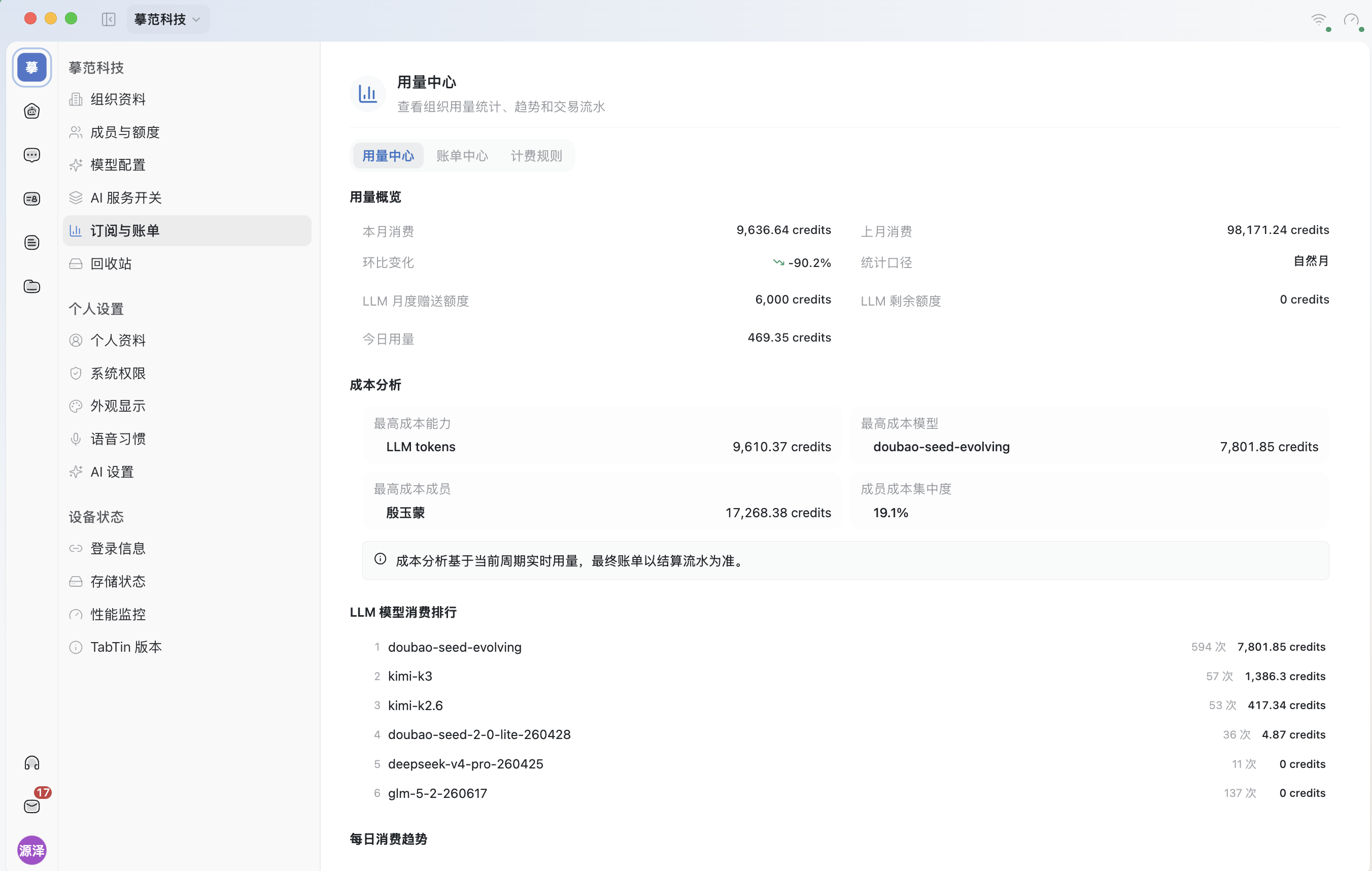
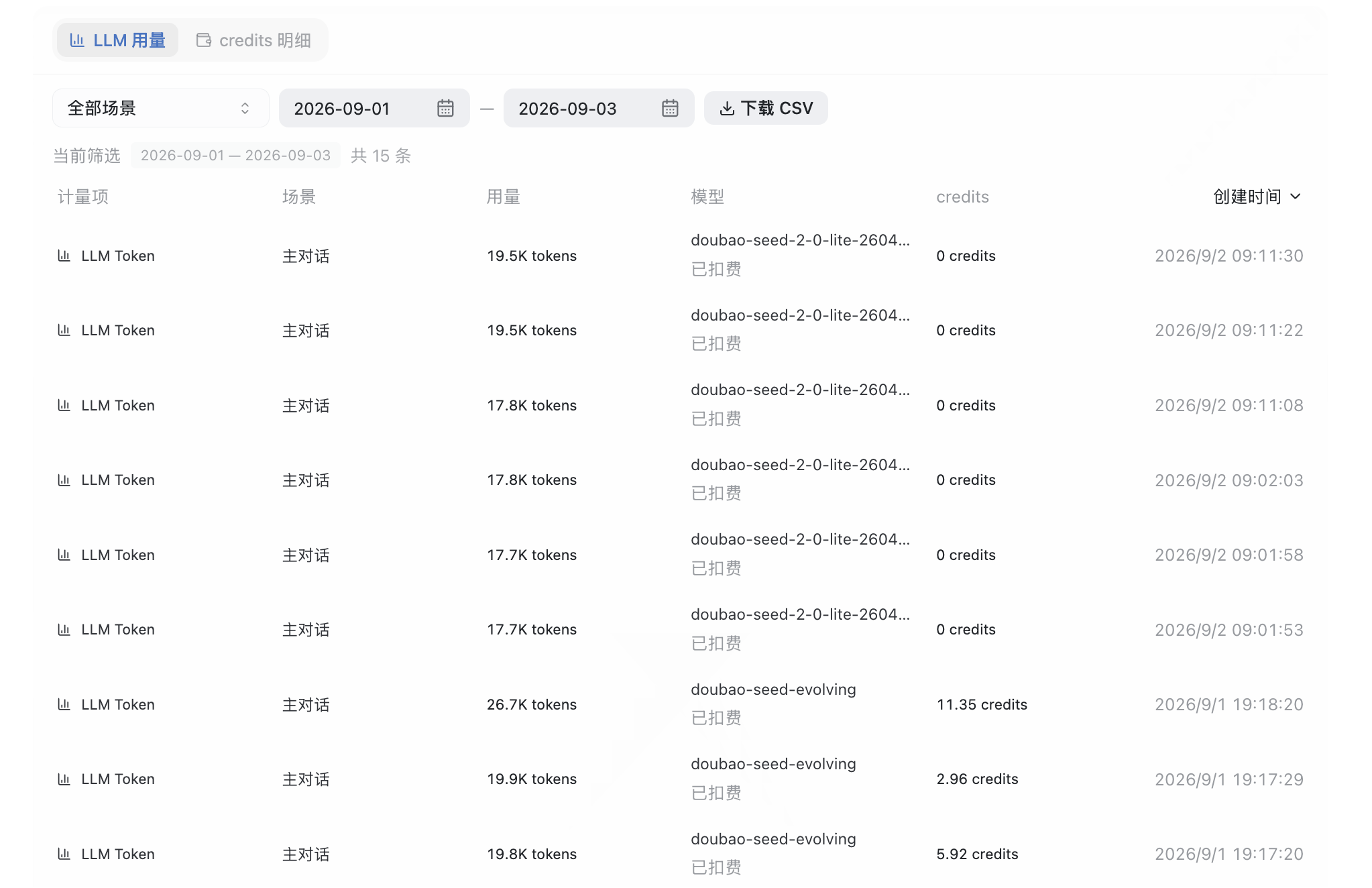
Settings on the AI service toggles page are independent. Two organization balance controls in the Owner view are directly relevant to quota troubleshooting:
- Automatic credit replenishment (Owner view): the organization Owner can enable replenishment below a threshold and set the amount per refill and a monthly spending cap;
- Low balance alert (Owner view): sets warning and critical thresholds. It only sends reminders; it does not restore LLM quota or remove rate limits.
These manage the organization balance. They are neither the monthly LLM allowance nor upstream subscription quota.
The current client’s AI service toggles page shows charges deducted in this order:
Plan credits → credit packs → organization balance
If none of these layers has enough available quota, the Agent may show “No quota” or “Insufficient balance” before execution starts. Some organization AI settings are Owner-only; ordinary members need to contact the organization Owner.
4. The task makes more calls than you expect
An Agent does more than forward a sentence to a model. A task may involve:
- Multiple rounds of planning, execution, and result verification;
- Search, browser, document, or spreadsheet tool calls;
- Work delegated to sub-Agents;
- Automatic retries after failures;
- Higher token usage from long context.
A short message sent once may trigger several model requests behind the scenes. Subscription quotas or API limits can therefore run out faster than in ordinary chat.
5. This is a rate limit, not a lack of funds
“Rate limited” usually corresponds to rate limit, Too Many Requests or 429. It means requests are too frequent within a given period. Common triggers include:
- Submitting several Agent tasks in quick succession;
- Multiple members sharing the same organization model service;
- Reaching the model’s concurrency, QPS, TPM, or context processing limit;
- Temporary upstream safeguards or service congestion.
Adding funds usually cannot remove this restriction immediately. Wait for the rate-limit window to reset, reduce concurrency, then retry or switch to another model from the same provider.
6. The account, organization, or device does not match
Common cases include:
- The subscribed account differs from the account authorized in TabTin;
- You are signed into another organization or workspace;
- You configured a personal model service, but the task uses the team default;
- ChatGPT Codex authorization is stored only on the current device, so another computer requires a fresh sign-in;
- The service exists but its status is not “Normal,” or its key has expired or permissions were revoked.
First identify whether this is “No quota” or “Rate limited”
| Message or symptom | Likely cause | What to do first |
|---|---|---|
No quota, insufficient balance, insufficient credits |
Insufficient TabTin organization credits or upstream plan/API quota | Confirm the current model route, then check organization billing and the upstream console separately |
Rate limited, rate limit, Too Many Requests, 429 |
Too many requests in a time window, excessive concurrency, or a model limit reached | Stop repeated retries, wait, and reduce concurrency or switch models |
| Invalid key, unauthorized, sign-in required | An issue with the connection method, key, account, or authorization | Retest the connection, update the key, or reauthorize in model configuration |
| Timeout, service unavailable | A temporary upstream service, network, or gateway issue | Test the connection, check service status, and retry later |
Recommended troubleshooting order
Step 1: Confirm the model the task is using
Open the Agent task’s model picker and note the full name and group. Do not rely on which provider you previously connected; check what this request actually selected.
Step 2: Check the model service status
Open Organization settings → Model configuration:
- Confirm that the service has been added;
- Confirm its status is “Normal”;
- Click “Test connection”;
- For ChatGPT Codex, complete ChatGPT sign-in authorization again on this device;
- For Kimi, Volcengine Ark, MiniMax, and others, confirm that the connection method and key match the plan.
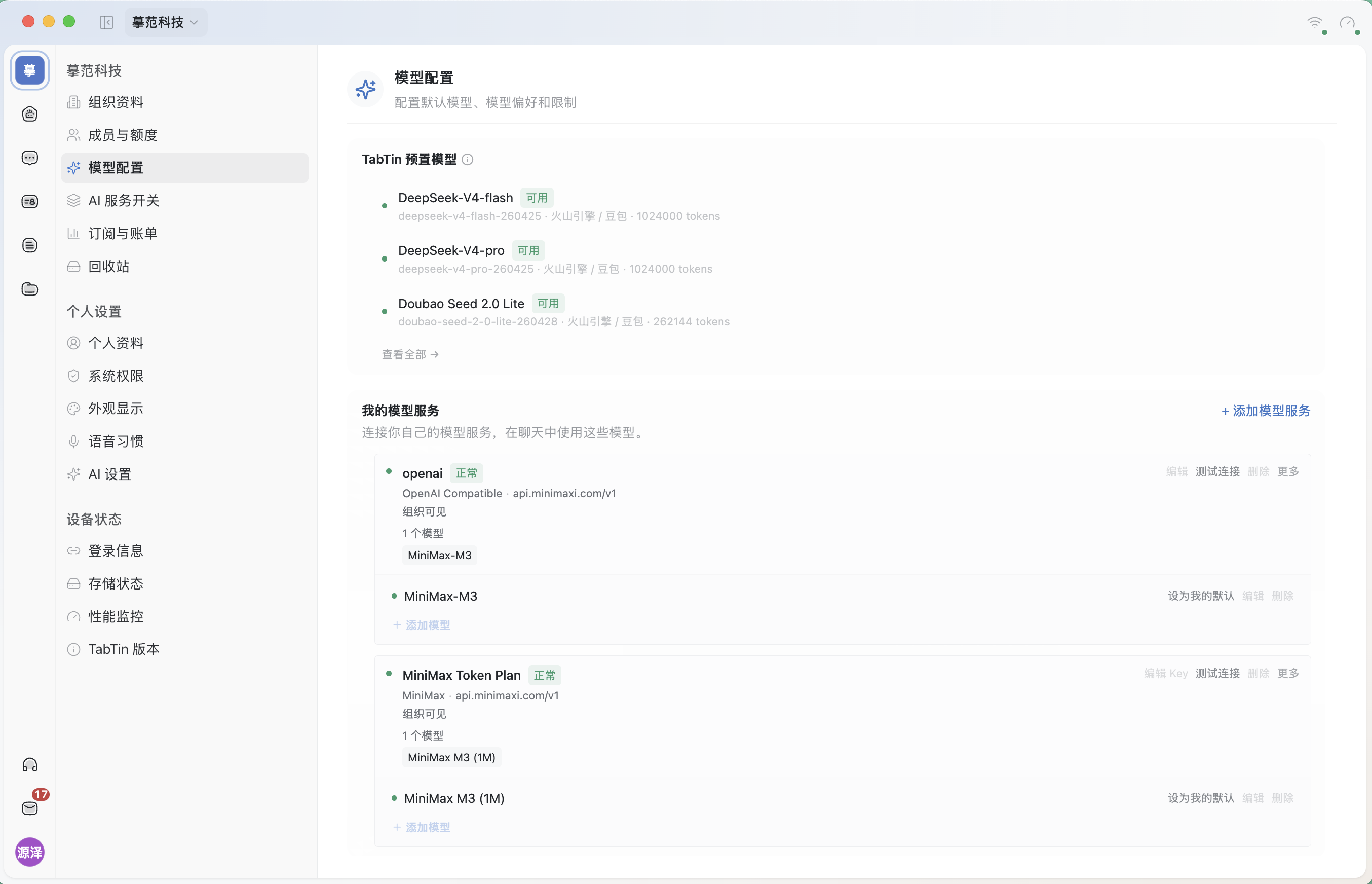
The verification screenshot shows two model services, both with “Normal” status and “Test connection” on their right. If your organization says “No model services connected yet” or shows another status, that means something different. An empty configuration page does not indicate a successful connection.
Do not send passwords, cookies, API keys, or authorization information to support or anyone else.
Step 3: Distinguish quota issues from rate limits
- If it explicitly says
insufficient creditsor insufficient balance, check quota and the charging path first; - If it explicitly says
429,rate limitorToo Many Requests: stop repeatedly clicking retry and wait for the window to reset; - If neither appears and only a sign-in or key error is shown, fix authorization and connection settings first.
Step 4: Try a smaller task
Close unnecessary concurrent tasks, reduce the materials uploaded at once, or split a long task into stages. Then start a simple task using the same model:
- If the simple task also fails, a connection, quota, or service status issue is more likely;
- If it succeeds but the complex task fails, context length, call count, concurrency, or model capability limits are more likely.
Step 5: Record full details if the problem persists
Include the following when reporting the issue to make diagnosis easier:
- Current organization and workspace;
- Full model name and group;
- Whether you use a platform model, Organization BYOK, or ChatGPT Codex;
- Exact error message, error code, and time;
- Whether only complex Agent tasks fail;
- Screenshots of model configuration and the error.
Hide account details, phone numbers, keys, cookies, and other sensitive information.
Common misconceptions
“I have a subscription, so usage should be unlimited”
A subscription typically grants access to a specific provider’s product or plan. It may still limit models, time windows, concurrency, tokens, or fair use.
“I connected my model, so why are TabTin credits still deducted?”
First confirm that the task actually selected your own model. Some non-chat capabilities may still use TabTin platform models. Switching to a platform model also deducts credits under organization rules.
“If I keep retrying, it will eventually work, right?”
With rate limits, repeated retries can increase request density and delay recovery. Stop, wait for the window to reset, then retry with lower concurrency.
“I’ll send support my subscription account or key so they can log in for me”
Do not do this. Complete authorization yourself on the current device. Never send API keys as plain text in chats, screenshots, or email.
Still stuck?
Send the model name, group, organization/workspace, exact error message, error code, time, and redacted screenshots to TabTin support: contact@larchiveai.com. Do not include passwords, cookies, API keys, or full authorization information.